Step 3 - Detailed Design
Model Design
Note that we have split the design into two sides: Model and View. This section elaborates the model side. The next section covers the view, including the GUI components.
- Object Model
- for the “model” side of the Model-View Design Pattern
- this is the Hops class, and not much else
- Dynamic Model
- Functional Model
Design-Level Object Model
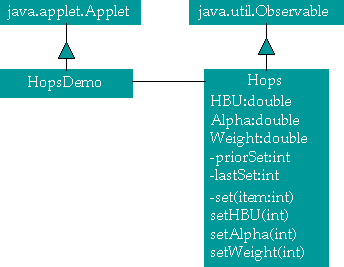
The implementation of the Model will have two components. The GUI, derived from Applet, will be called HopsDemo, and will reference an object of class Hops. The Hops class will be derived from Observable to exploit the built-in functionality.
Note that the Hops class has been extended to include private attributes priorSet, lastSet and private set operation. The attributes are used to determine what two attributes were recently set. The third attribute is computed from these two. The set function is used by the public setHBU, setAlpha and setWeight functions. These call the private set function to compute the missing attribute and then notify the observers.
Design-Level Dynamic Model
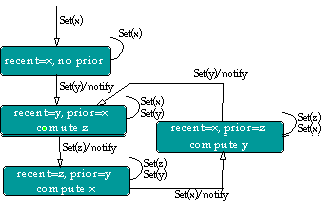
This shows the detailed algorithm for determining what has changed and what should be computed. The events are set(x), set(y) and set(z) where the argument is the attribute which is being set. The notify event broadcasts change information to all observers. Note that there is a path to compute any of x, y or z. Each compute state is accompanied by the notify event.
Design-Level Functional Model
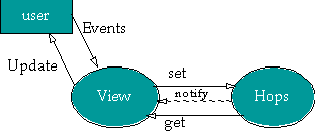
This model details the data flows among the components. The user provides events to the GUI (view) objects, and the view objects respond by updating the display seen by the user. The details are buried in the AWT implementation.
Based on our dynamic model, we show the events which cause this applet to work. The set events change the state of the model. The model will notify the view objects that the model has computed an attribute. The view objects will then use get methods to determine the values of the attributes.
View Design
- Object Model
- for the “view” side of the Model-View Design Pattern
- this is the GUI design which the user sees
- Dynamic Model
- Functional Model
View’s Picture
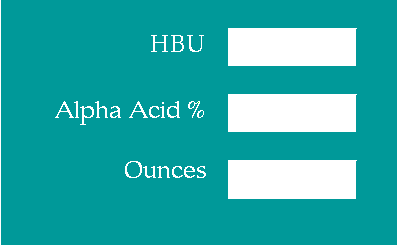
This is what the GUI will look like. Three simple fields and labels. No buttons. We will use the AWT’s events to notify us that the user has entered data in a field. These will become our internal set events.
Design-Level Object Model
The HopsDemo is a specialization of Applet. It refers to the Hops model, shown in Model Design . The HopsDemo contains 3 labels and 3 fields. The fields are specializations of standard TextField. The NumTextField objects add operations to return numeric values and sets numeric values. This is a trivial extension, and doesn’t restrict the user’s input to value numbers – instead it posts an error message for non-numeric input.
This NumTextField extension of TextField shows (in a limited way) some real advantage of object-orientation. First, we can add functionality via inheritance. Second, and more important, we can build a reusable element. We can imagine having DateTextField for date input and MoneyTextField for monetary input.

Design-Level Dynamic Model
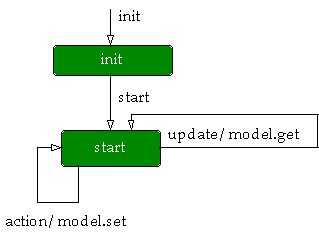
This is the dynamic model for the applet. The update event is notification from the Hops model that a state change has occured. This is part of the standard Observer-Observable functionality. In response to the update event, we do a series of get operations to interrogate the Hops model for the values of the attributes.
The action event is from the AWT, and is sent when the user hits return in a text field, indicating that they are done with input. In response to the action event, we set a specific attribute of the Hops model. The Hops model may respond with an update event if it computed an attribute based on our input.
Design-Level Functional Model
This is a more complete data flow. It shows low-level toolkit events (these are originated by the AWT peers). The event is sent to an action handler in the applet. This handler may use the get operation in a NumTextField to get the current value of that field. This value is then passed to the Hops model.
The Hops model, after two items are set, will then notify the Applet’s update handler. This update handler, once notified, will use the model’s get operation to get values from the model and set these into the displayed NumTextFields.
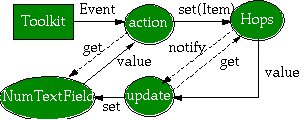
A sensible alternative might be to pass the NumTextFields to the Hops model, so they can be updated directly. This limits reuse by binding a specific GUI feature to a reusable abstraction. The model could be used in a GUI which had sliders or dials instead of text fields. This implementation, while requiring am update handler to take values from the Hops model and display them, divorces the GUI details from the Hops calculation details.
